Prism
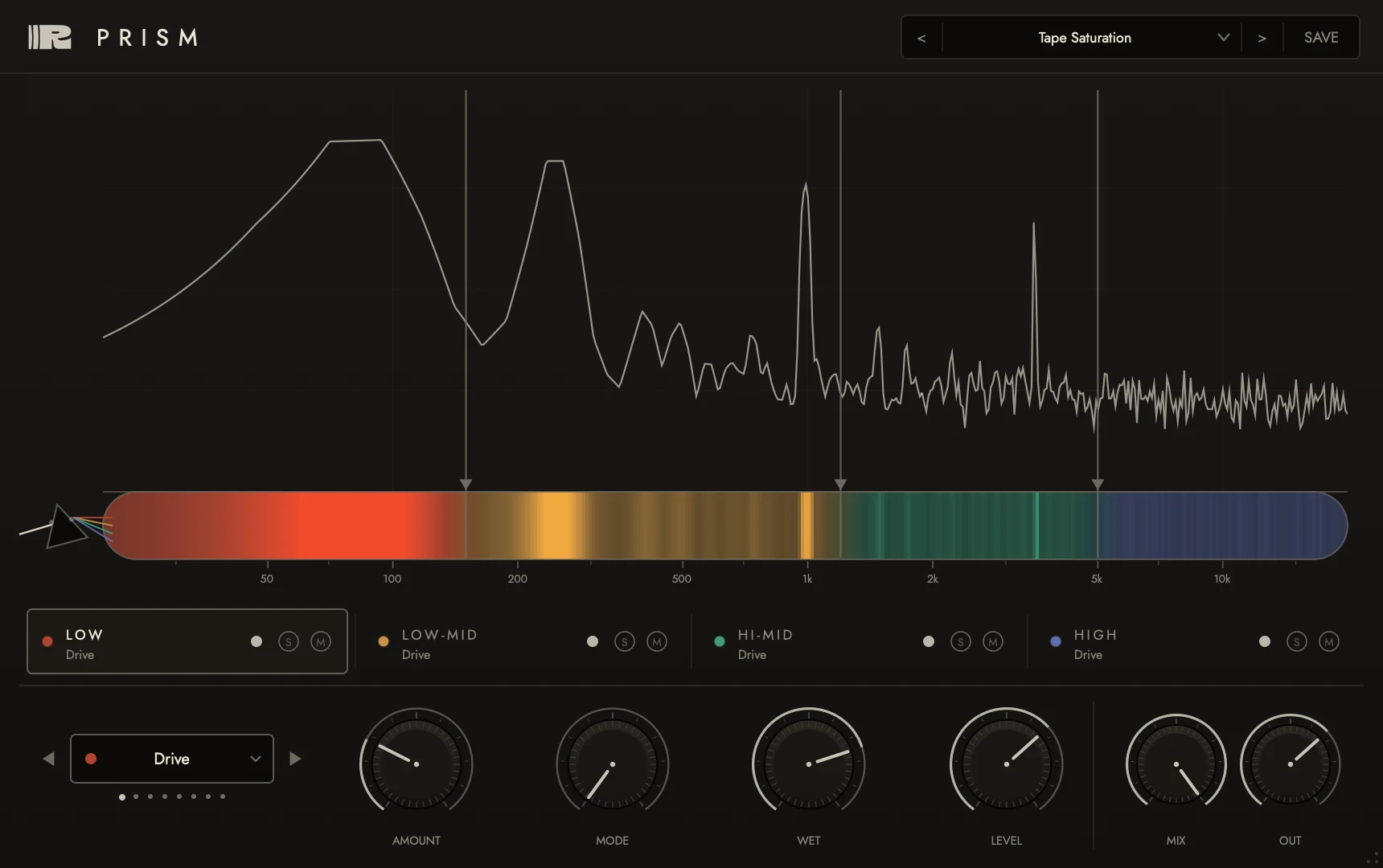
Most plugins treat the whole signal as one thing. Prism doesn't. Split the audio into frequency bands and route each band through its own effect - drive on the lows, chorus on the mids, delay on the highs - with a live FFT showing exactly what each band is doing.
No iLok. No subscription. Buy once, it's yours - VST3 and AU for macOS and Windows.
Installing on Windows? Read this first
Windows shows a blue "Windows protected your PC" screen for any app it hasn't seen before, including ours. To continue:
- Click More info on the blue screen.
- Click Run anyway, then follow the installer.
- FormatsVST3 · AU
- PlatformsmacOS · Windows
- TypeInsert effect
- Best forMix bus · mastering · sound design
Eight effects.
One signal, split.
Pick the band split, pick the effect per band, watch the FFT show you what each band is doing, then mix it in. For anytime you want "that effect, but only on the highs" - or "saturation, but not on the bass."
Per-band processing
Four bands with adjustable crossovers, each through its own effect - drive, chorus, delay, reverb, phaser, comp, crush or filter.
Independent dynamics
Run comp on one band and crush on another, with per-band level, solo and mute. Lo-fi as a surgical tool.
Live FFT
Drag the band edges right on the spectrum and carve each band before it sums back through the global parallel mix.